Tuesday, October 23, 2007

Ubuntu 7.10 (Gutsy Gibbon)

Gutsy Gibbon is the codename of the latest Ubuntu 7.10 released last October 18, 2007, but I've waited a little while before upgrading from Feisty Fawn (v7.04). Its because I was anticipating some problems during the upgrade, so better wait for others and their experiences, then probably for the solutions =)

That's right! Yesterday, I was brave enough to do the upgrade. Just clicked the update notification icon to install some (security) updates. When the update was done, the Upgrade notification flashed, ready to install.

It took some hours to finish the Ubuntu upgrade. Then, the VMware Workstation needed to be re-setup (as always) because some vmware modules need to be recompiled according to your running kernel version.

Note: To check your current kernel version, type uname -r at the console.

Whenever you need to install/re-install VMware on Linux, always remember the vmware-any-any* patch because you'll most likely need it for recompiling some vmware's components, like vmmon, etc.

And whenever you need it, just look for the updated version because its also being modified regularly. Thanks to the readily available solution to my problem:
http://ubuntu-tutorials.com/2007/09/26/how-to-install-vmware-server-on-ubuntu-710/

As I've said, its worth it for the wait ;-)

Monday, October 22, 2007

Where to go in Canada?

Are you wishing to move in Canada? Where do you wanna go and live?
Here's some info that could help you:
Canada's best places to live

Friday, October 19, 2007

Sunday, October 07, 2007

Virus infection through web surfing

Typical scenario would probably be: you visited a website and you clicked some links (either you've been teased or you really wanted to go there), then the harmful script run that caused your browser to be redirected to some malicious websites.

So if you're the bad ass hacker, where do you want to implant those malicious scripts/codes that would lead to virus infection? Good candidates would be those popular sites such as social networking sites (friendster, myspace, etc), or the likes of youtube, digg, and other very popular sites. Then that guy would do his trick to persuade you on clicking his malicious link (unless hes got new technique (i mean, new vulnerability probably, or any way to exploit some security loopholes) how to download and execute his program to user's pc automagically =)).

Take a look on this example of an entry on digg:


Its "Eva Longoria sex tape" That would be very tempting to check out isn't it? =P Now, the bad ass will post a comment specifying the link for the video. And because you're excited to see it (who wouldn't?), you clicked the link and the browser will of course drive you to the destination.
But the website (supposedly hosting the sex video) displayed some (fake) error message and would want you to install something to correct the error. Needless to say that the program it offered you to download and install is most likely a malicious software. Its usually a small program that when run, would download another (malicious) program, and the infection proceeds.
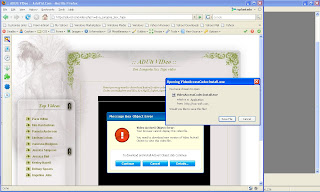

Because of some security measures from web browsers, automatic download and execute are now commonly prevented. Bad hacker must find a way (some sort of new vulnerability) to do the automatic download and execute from web browser. Otherwise, all they can do is to trick the user to download and run their code. In other words, don't run any program from untrusted source!

If your antivirus software didnt catch it, just send it to online virus scanners like virustotal or virusscan. Some AV products might have already detection for it:
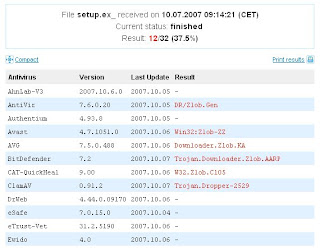

If you're curious what the f$%k is it doing, check their website for virus description. If no analysis for it yet, send it to sunbelt's malware analyzer. Thanks to sunbelt for its wonderful free service that would save some precious time analyzing some malware. In fact, I've sent the sample to sunbelt and the complete analysis can be found here.


Unless you have free time to dissect it by your own for curiosity, you can check my previous post on tools that could help you reverse engineer a malware.

Clearly, when you check the sunbelt's analysis for its activities, it's a malicious program that downloads another programs (could be another virus or worms) from a remote websites, executes it to the PC, modifies some registries to run everytime , drop other components and so on so forth - typical malware behavior.

Sunday, September 16, 2007

Anti-debugging paper

From time to time, we encounter old and new tricks how to defeat debugging or atleast to slow down the reversing process. And the list continues to grow until today. Some might have faded now in your memory, but a guy from SecFocus has a great job outlining most of the known anti-debugging techniques as of today. Check out this post from Secfocus.

Thursday, September 13, 2007

Some Linux shortcuts

While some of them are very common, you might still learn some, as I do.

# / - root directory
# ./ - current directory
# ./command_name - run a command in the current directory when the
current directory is not on the path
# ../ - parent directory
# ~ - home directory
# $ - typical prompt when logged in as ordinary user
# # - typical prompt when logged in as root or superuser
# ! - repeat specified command
# !! - repeat previous command
# ^^ - repeat previous command with substitution
# & - run a program in background mode
# [Tab][Tab] - prints a list of all available commands. This is just an
example of autocomplete with no restriction on the first letter.

# x[Tab][Tab] - prints a list of all available completions for a
command, where the beginning is "x''

# [Alt][Ctrl][F1] - switch to the first virtual text console

# [Alt][Ctrl][Fn] - switch to the nth virtual text console. Typically,
there are six on a Linux PC system.

# [Alt][Ctrl][F7] - switch to the first GUI console, if there is one
running. If the graphical console freezes, one can switch to a
nongraphical console, kill the process that is giving problems, and
switch back to the graphical console using this shortcut.

# [ArrowUp] - scroll through the command history (in bash)

# [Shift][PageUp] - scroll terminal output up. This also works at the
login prompt, so you can scroll through your boot messages.

# [Shift][PageDown] - scroll terminal output down

# [Ctrl][Alt][+] - switch to next X server resolution (if the server is
set up for more than one resolution)

# [Ctrl][Alt][-] - change to previous X server resolution

# [Ctrl][Alt][BkSpc] - kill the current X server. Used when normal exit
is not possible.

# [Ctrl][Alt][Del] - shut down the system and reboot

# [Ctrl]c - kill the current process

# [Ctrl]d - logout from the current terminal

# [Ctrl]s - stop transfer to current terminal

# [Ctrl]q - resume transfer to current terminal. This should be tried if
the terminal stops responding.

# [Ctrl]z - send current process to the background

# reset - restore a terminal to its default settings

# [Leftmousebutton] - Hold down left mouse button and drag to highlight
text. Releasing the button copies the region to the text buffer under X
and (if gpm is installed) in console mode.

# [Middlemousebutton] - Copies text from the text buffer and inserts it
at the cursor location. With a two-button mouse, click on both buttons
simultaneously. It is necessary for three-button emulation to be
enabled, either under gpm or in XF86Config.
---

Read more..

Tuesday, September 11, 2007

How to assign hot key to Ubuntu?


1. Press Alt-F2 to open the Run application menu bar. Type gconf-editor and press Run button.

2. The Configuration Editor will show up. Go to /apps/metacity/keybinding_commands key (similar to Windows' registry) and double-click the unused name key, for example command_1. It is usually String type to accept command string. Input the name of the executable or command in the Value text box. For example, in the screenshot, I typed Konsole for the KDE terminal console executable.


3. Then go to
/apps/metacity/global_keybindings as shown in the screenshot below. Find and double-click the binding key associated to your command key in step #2. For example, run_command_1. Assign a shortcut key by typing it to the Value text box. This will be your shortcut whenever you want to run the command/executable in step #2. In my example, I chose K to open a KDE console terminal. You may choose your own preferred short cut combination, like combination of , and a letter. Click OK's and close the Configuration Editor. You may now try your shortcut key!

4.You can add more shortcut key for all your frequently used programs.


Monday, September 10, 2007

Sohanad!

I'm using Yahoo! Messenger most of the time as my instant messenger to contact with my friends. From time to time I would see other's YM status to something very familiar to me. And until this time, I still receive messages from someone with the similar below:


Its an indication that she/he is infected by a variant of Sohanad worm, most probably WORM_SOHANAD.AF. Once the worm is active, it will send out some built in messages to all your contacts without your knowledge and consent. This is one of many interesting Internet worms due to its agility and power to stay in the wild for quiet some time now. This is an evolving worm from a lame being to some exploit usage that made it always on the radar. If you're interested how its evolved, here's the blog from Trendmicro.

It modifies IE's default home page, disables Task Manager and Registry editor, disables the Run option in the command menu, modifies some YM's settings, and may terminate some security programs (ie antivitus, firewall, etc) running in the infected PC. These payloads needs some proper restoration process, otherwise, you might not be able to edit your registry or execute command from Run menu anymore =).
To clean .AF variant, you can follow the manual instructions.
If you're not sure of which variant got hit you, you might consider Trendmicro's free online scanner. It will execute its famous DCT (Damage Cleanup Template) technology to scan and clean your computer from most internet worms.

Tuesday, September 04, 2007

Show me the World, Windows!

I've encountered some Windows nuances which attributed to some registry
corruption error. For some reason, I couldn't view the tabs of my
Display Properties and the Network Properties.

Thanks to google for being so helpful as always! :)

In the first error, I've found this link as the solution, and it worked!
http://www.winhelponline.com/articles/38/1/

The next day, I've noticed that I can't connect from the remote machine to access
my shared folder in WinXP machine. When I was about to check the network setting, the
tabs in the Network properties are gone too! Thanks to this link for the solution:
http://www.jsifaq.com/SF/Tips/Tip.aspx?id=5281

I used to take note troubleshooting experience because it can be handy
in the future when needed. So this not some-sort-of
superb-troubleshooting-technique-or-whatever. I just post it as a
post-it! :)

Saturday, August 25, 2007

"Patsam" time!

Patsam, short for "Patsambahan" =)

Sinigang na Baboy


Nilagang baka. Sarap to sa patis na me kalamansi =)

Tuesday, August 14, 2007

Other look of OSI model

Guys from Erratasec are always dishing out crisp informations about network security..
Another informative knowledge was instilled on this post about OSI model.
Hmmm ganun pala yun??! =)

Saturday, August 04, 2007

Immunity Debugger is out!!

I've waited this for quiet awhile.. finally, the Immunity debugger is out fresh from the oven!!
Download it from immunity website: http://www.immunitysec.com/products-immdbg.shtml

From its website:

A debugger with functionality designed specifically for the security industry
Cuts exploit development time by 50%
Simple, understandable interfaces
Robust and powerful scripting language for automating intelligent debugging
Lightweight and fast debugging to prevent corruption during complex analysis
Connectivity to fuzzers and exploit development tools

It combines the functionalities of the WinDbg and OllyDbg and a lot more. It supports the command-line shortcuts for WinDbg and the GUI of OllyDbg. It also allows remote debugging and can show some functions graph if you want to visually check the codes. Above all, it was designed for vulnerability analysis and exploit development with emphasis on heap exploitation.

Tuesday, July 17, 2007

MS Security Summit 2007

Some pictures during our "journey" going to Redmond, WA to attend "Microsoft Security Summit 2007" on June 11-13, 2007. From Vancouver, Canada, we (me and Rodel) traveled by his car going to Microsoft's campus. It was my first time crossing the border by land, so I have to secure clearance from the border security. I was interviewed by the security personnel, who is a retired US Navy. But to my surprise, the security person was a pure bicolano! (Bicolano refers to a person who comes (or originated) from Bicol Province in the Philippines). So the interview went very much casual, in fact we were talking in bicolano dialect. Cool! =)

US Border sign

After the border, our travel was smooth, until we reached the Seatle's Premium Outlets. Of course, it nice to check some branded items in a cheaper prices. I got a pair of Diesel shoes, for casual wear.
Premium Outlets in Seatle

Then, when we saw the sign below, we knew we're there inside Microsoft's campus already. If I heard it right, there are 116 buildings in Redmond campus of 3.1 million square feet (288,000 square meters) Oh yeah, thats huge right?
Anyway, we we're actually late when we arrived Monday afternoon, so we just hanged out with Trender people, like Jong, Joe, Jamez, etc, and waited for the shuttle bus going to Seatle's Needle Space. Actually its one of the reasons why I waited for this chance to attend the summit. The main reason is of course to experience the Microsoft's environment and to meet those guys from AV industry, and people from MS like Michael Howard, Mark Russinovich, and among others; and to have reason for my US B1/B2 visa application. Lolz!

Near Microsoft's gateway


Microsoft prepared the dinner at the Needle Space. You have the food and the view, woah! Awesome! :)

Seatle Space Needle

View from Space Needle
Vince (former Trender too like us, now working in MS) roamed us a bit more around downtown with his Mazda 3 :). The famous Starbucks coffee is one of many reasons why Seattle is popular. The picture below is the first and original Starbucks store:
The original Starbucks Coffee!

After more strolling around the downtown area, we went home and stayed at Vince's pad.

The next morning, we woke up earlier to catch for breakfast! One interesting topic is Mark Russinovich's talk about Vista securities and features. He discussed the security architecture of the Vista and some tweaks to make Vista more effective and efficient as they say. Another topic which caught my interest was Mike Howard's talk about Security Development Life Cycle (SDL). Also one presenter, discussed the IPv6 on Vista and its abundant feature list! And a bunch of evangelical preaches about Vista were discussed by other presenters. No doubt, they wanted to sell Vista to the audience! Other topics were for management people and a bit boring =)

Overall the summit was good enough. The foods were great. The experience of meeting AV guys was satisfying. And above all, the freebies (below) were..well..not bad! =P


Freebies:
- Windows Vista Security Guide (Book)
- The Security Development Life Cycle (Book)
- Writing Secure Code for Windows Vista (Book)
- Wireless Laser Mouse 5000
- Windows Vista Operating System
- Black Notebook
- USB flash disk

WinDbg Commands

WinDbg is a combination of User-Mode and Kernel-Mode debugger from M$, and a good alternative to OllyDbg and IDA Pro, especially when debugging Windows services.

I'm actually new to WinDbg, but it looks promising enough, it has lots of commands to get familiar with.

To start with WinDbg, download it for free from Microsoft website:
http://www.microsoft.com/whdc/devtools/debugging/installx86.mspx

Browse its Help file to get started with the commands, or you can check the ff links for some of the most commonly used commands:
http://www.tonyschr.net/debugging.htm
http://www.codeproject.com/debug/windbg_part1.asp#_Toc64133680

Monday, June 25, 2007

eEye Blink Personal Edition - FREE!!

Just noticed that eEye offered their Blink Personal Edition to public for free..So I gave it a try..why not? Having a good reputation in security must be showing something different.
So I grabbed a copy and a 1-year license key and immediately installed it.
The GUI is different from other of its kind - it mimics as Windows XP's Control Panel applet, including its icons are very much Windowshish.

Immediately after the installation, you can update with its latest malware definition file:


Based from its website, it offers a complete Internet Security solution for home and desktop users, posing as a well-rounded security software compared to its competitors.

Its security features are fully customizable too! You can modify the default settings of its components (ie. Application Firewall, Host-based Intrusion Prevention, etc) to your liking.
Basically it combines the common Anti malware technologies (ie. anti-virus, anti-spyware, anti-phising, etc) and the security or vulnerability technologies (ie. buffer overflow protection, application execution protection, 0-day protection, etc). Its almost perfect, feature wise! What seems to lack is a rootkit detection? Hoping that it would catch the rootkit prior or during its installation, otherwise it wont detect existence of a rootkit ( I guess) in a compromise PC.

Download it from eEye site.

Hmm..sounds good eh?

Sunday, June 24, 2007

Awesome artwork!

Woah!! incredible, truly awesome piece of art work indeed!
http://gryf.feathers.net/

Wednesday, June 20, 2007

VMware's vmmon is broken under Ubuntu Feisty (7.04)

You can install the VMware Workstation on Ubuntu Feisty Fawn (7.04) like this:

rplantado@rexubuntu:~/Installers/vmware-distrib$ sudo ./vmware-config.pl


Then, just follow the wizard and accept the default values. But along with the installation process, it halted with the following error when compiling the vmmon module:


What is the location of the directory of C header files that match your running
kernel? [/usr/src/linux-headers-2.6.20-16-386/include]

Extracting the sources of the vmmon module.

Building the vmmon module.

Using 2.6.x kernel build system.
make: Entering directory `/tmp/vmware-config4/vmmon-only'
make -C /usr/src/linux-headers-2.6.20-16-386/include/.. SUBDIRS=$PWD SRCROOT=$PWD/. modules
make[1]: Entering directory `/usr/src/linux-headers-2.6.20-16-386'
CC [M] /tmp/vmware-config4/vmmon-only/linux/driver.o
In file included from /tmp/vmware-config4/vmmon-only/linux/driver.c:80:
/tmp/vmware-config4/vmmon-only/./include/compat_kernel.h:21: error: expected declaration specifiers or ‘...’ before ‘compat_exit’
/tmp/vmware-config4/vmmon-only/./include/compat_kernel.h:21: error: expected declaration specifiers or ‘...’ before ‘exit_code’
/tmp/vmware-config4/vmmon-only/./include/compat_kernel.h:21: warning: type defaults to ‘int’ in declaration of ‘_syscall1’
make[2]: *** [/tmp/vmware-config4/vmmon-only/linux/driver.o] Error 1
make[1]: *** [_module_/tmp/vmware-config4/vmmon-only] Error 2
make[1]: Leaving directory `/usr/src/linux-headers-2.6.20-16-386'
make: *** [vmmon.ko] Error 2
make: Leaving directory `/tmp/vmware-config4/vmmon-only'
Unable to build the vmmon module.

For more information on how to troubleshoot module-related problems, please
visit our Web site at "http://www.vmware.com/download/modules/modules.html" and
"http://www.vmware.com/support/reference/linux/prebuilt_modules_linux.html".

Execution aborted.

Solution: Edit compat_kernel.h in vmmon.tar:
Steps:
Go to the vmmon folder:

rplantado@rexubuntu:~/cd /usr/lib/modules/source/

Create backup copy of vmmon.tar:
rplantado@rexubuntu:/usr/lib/modules/source/$ cp vmmon.tar vmmon.tar.backup

Extract the tar file to its folder vmmon-only:
rplantado@rexubuntu:/usr/lib/modules/source/$ tar -xvf vmmon.tar

Open the include file compat_kernel.h:
rplantado@rexubuntu:/usr/lib/modules/source/$ vim vmmon-only/include/compat_kernel.h

Search and comment out the line:
static inline _syscall1(int, compat_exit, int, exit_code);

So it should look like:
/* static inline _syscall1(int, compat_exit, int, exit_code); */

Put back the files into vmmon.tar again:
rplantado@rexubuntu:/usr/lib/modules/source/$ chmod 755 vmmon.tar
rplantado@rexubuntu:/usr/lib/modules/source/$ tar -cvf vmmon.tar vmmon-only


Then repeat the installation process and it should be smooth now..

rplantado@rexubuntu:~/Installers/vmware-distrib$ sudo ./vmware-config.pl


:
:
Building the vmnet module.

Using 2.6.x kernel build system.
make: Entering directory `/tmp/vmware-config5/vmnet-only'
make -C /usr/src/linux-headers-2.6.20-16-386/include/.. SUBDIRS=$PWD SRCROOT=$PWD/. modules
make[1]: Entering directory `/usr/src/linux-headers-2.6.20-16-386'
CC [M] /tmp/vmware-config5/vmnet-only/driver.o
CC [M] /tmp/vmware-config5/vmnet-only/hub.o
CC [M] /tmp/vmware-config5/vmnet-only/userif.o
CC [M] /tmp/vmware-config5/vmnet-only/netif.o
CC [M] /tmp/vmware-config5/vmnet-only/bridge.o
CC [M] /tmp/vmware-config5/vmnet-only/procfs.o
CC [M] /tmp/vmware-config5/vmnet-only/smac_compat.o
SHIPPED /tmp/vmware-config5/vmnet-only/smac_linux.x386.o
LD [M] /tmp/vmware-config5/vmnet-only/vmnet.o
Building modules, stage 2.
MODPOST 1 modules
WARNING: could not find /tmp/vmware-config5/vmnet-only/.smac_linux.x386.o.cmd for /tmp/vmware-config5/vmnet-only/smac_linux.x386.o
CC /tmp/vmware-config5/vmnet-only/vmnet.mod.o
LD [M] /tmp/vmware-config5/vmnet-only/vmnet.ko
make[1]: Leaving directory `/usr/src/linux-headers-2.6.20-16-386'
cp -f vmnet.ko ./../vmnet.o
make: Leaving directory `/tmp/vmware-config5/vmnet-only'
The module loads perfectly in the running kernel.

Starting VMware services:
Virtual machine monitor done
Virtual ethernet done
Bridged networking on /dev/vmnet0 done
Host-only networking on /dev/vmnet1 (background) done
Host-only networking on /dev/vmnet8 (background) done
NAT service on /dev/vmnet8 done

The configuration of VMware Workstation 5.5.4 build-44386 for Linux for this
running kernel completed successfully.

You can now run VMware Workstation by invoking the following command:
"/usr/bin/vmware".

Enjoy,

--the VMware team

Monday, May 28, 2007

Hot!! ti-98 titanium virus!! Hot!!

Piotr Bania created the world's first ti-98 Titanium virus!
Take note, its an EPO virus.

Here's the link: http://piotrbania.com/all/ti89/

For educational purposes only!!

Cheers!

Saturday, May 19, 2007

Are you pretty?

----------------Girls---------------
-----------are like apples-----------
-------on trees. The best ones------
-----are at the top of the tree.------
---The boys dont want to reach----
--for the good ones because they---
-r afraid of falling and getting hurt.-
-Instead, they get the rotten apples-
from the ground that arent as good,
but easy. So the apples up top think
something wrong with them when in
-reality they're amazing. They just--
---have to wait for the right boy to-
---- come along, the one who's-----
----------- brave enough to--------
---------------climb all------------
---------------the way------------
---------------to the top-- --------